
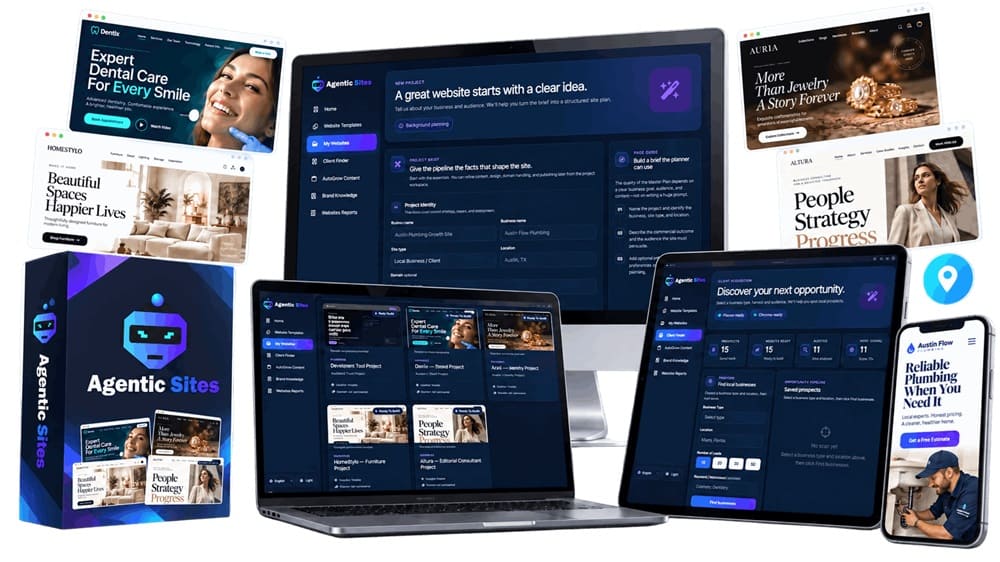
📋 Quick Summary
- Product: Agentic Sites
- Creators: Mosh Bari, Anirudh Baarva & Amit Gaikawad
- Front-End Price: $19 one-time (early-bird) 👉 Amazing Discounted Price Right Here! 📌
- Delivery: Cloud-based dashboard — nothing to install
- Niche: AI website planning, branding, and building, plus local-business lead generation
- Guarantee: 30 days, no questions asked
- Recommended For: Non-technical people who want a real business website fast, and anyone who wants to build and sell sites to local businesses — not for anyone needing deep custom functionality
What Is Agentic Sites? How Does It Work Step By Step?
Agentic Sites is a cloud-based platform that takes a short description of a business — what it does, who it serves, where it’s located — and runs that description through an AI workflow that plans the site’s structure, builds a brand (colors, fonts, tone of voice), generates the actual pages, and publishes them, all inside one dashboard. Nothing gets installed locally, and there’s no code to touch at any point.
The part that separates it from a plain AI site-builder is what happens after the site exists: a built-in tool scans for local businesses in a niche and area you pick, flags which ones have weak or outdated websites, and drafts an outreach pitch you can send them. In plain terms, it’s trying to be both a website factory and a lead-generation engine for anyone who wants to sell what it builds.
Here’s the step-by-step flow as I worked through it:
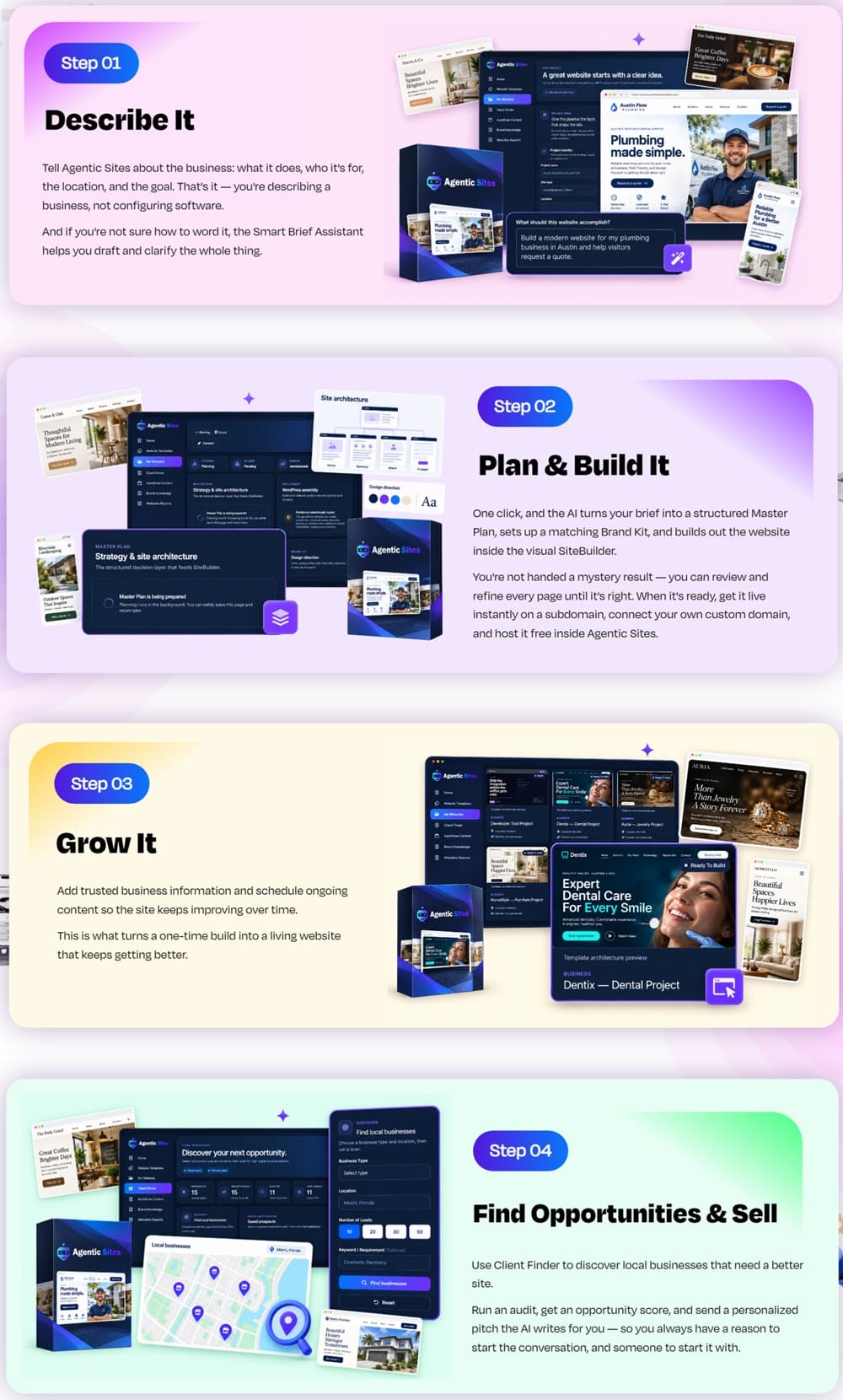
➤ Step 1 — Describe The Business. I typed in the business type, target audience, location and goal in plain sentences — no forms with forty fields, just a text box and a Smart Brief Assistant that asked me two or three follow-up questions when my first description was too thin.
➤ Step 2 — Let It Plan And Build. Within a couple of minutes it produced a Master Plan (the page list and how each one is positioned), a Brand Kit (colors, fonts, a tone-of-voice note), and then generated the actual pages. I reviewed everything in the visual SiteBuilder before anything went live — nothing publishes automatically without you clicking through it first.
➤ Step 3 — Grow It. I fed the Business Knowledge Hub a bit more detail about the fictional business (service list, a couple of FAQs) and scheduled a small content run so the site would keep adding pages instead of sitting static.
➤ Step 4 — Find And Sell. This is the step most website builders don’t have at all. I pointed the Lead Finder at a niche and a radius around my own city, and it came back with a list of real local businesses, each with an opportunity score based on things like mobile performance and how outdated their current site looked, plus a drafted pitch message for each one.
Agentic Sites Review — Key Features
✅ AI Business Planning From A Plain Description — you type what the business does and who it’s for, and the platform turns that into a page structure and positioning strategy on its own, instead of handing you a blank template to fill in yourself.
✅ Smart Brief Assistant — when my first description was too vague, it asked me two or three clarifying questions rather than just guessing, which noticeably improved what came out the other end.
✅ Master Plan Generation — a clear outline of every page the site will have and why, before any actual page gets built, so you can catch a wrong direction early instead of after the fact.
✅ AI Brand Kit — colors, fonts and a tone-of-voice note generated to match the business, then applied consistently across every page instead of you having to eyeball-match colors yourself.
✅ Visual SiteBuilder — a drag-and-review editor where you can tweak wording, swap sections, or reject a page and regenerate it before anything goes live.
✅ Multi-Project Workspace — every business idea I tried lived in its own project, which matters the moment you’re managing more than one site at a time.
✅ Business Knowledge Hub — a place to feed project-specific details (services, FAQs, policies) that future content generation actually draws from, instead of the AI making things up from nothing.
✅ Scheduled AI Content Workflow — new pages or posts can be queued to generate on a schedule, so a site keeps growing after the initial build instead of going stale.
✅ Local Business Lead Finder — surfaces real businesses in a niche and location, each with an opportunity score built from signals like mobile performance and how dated the current site looks.
✅ Personalized Pitch Generator — drafts an outreach message per lead referencing the specific issues found on their existing site, rather than one generic cold-pitch template for everyone.
✅ Free Hosting, Instant Subdomain Publish & Custom Domain Connect — a finished site can go live on a subdomain immediately, or be pointed at a domain the client already owns, with no separate hosting bill on your end.
✅ Backup & Rollback — every version of a site gets saved, so a bad edit or a client’s second-guessing doesn’t mean starting over.
✅ Full Commercial Rights — you’re licensed to build sites for other businesses and sell or rent them, which is the whole premise of the “find and sell” half of the platform.
👉 Get Agentic Sites At An Exclusively Discounted Price 📌
Agentic Sites Pricing & Funnel Summary
Agentic Sites Front End ($19)
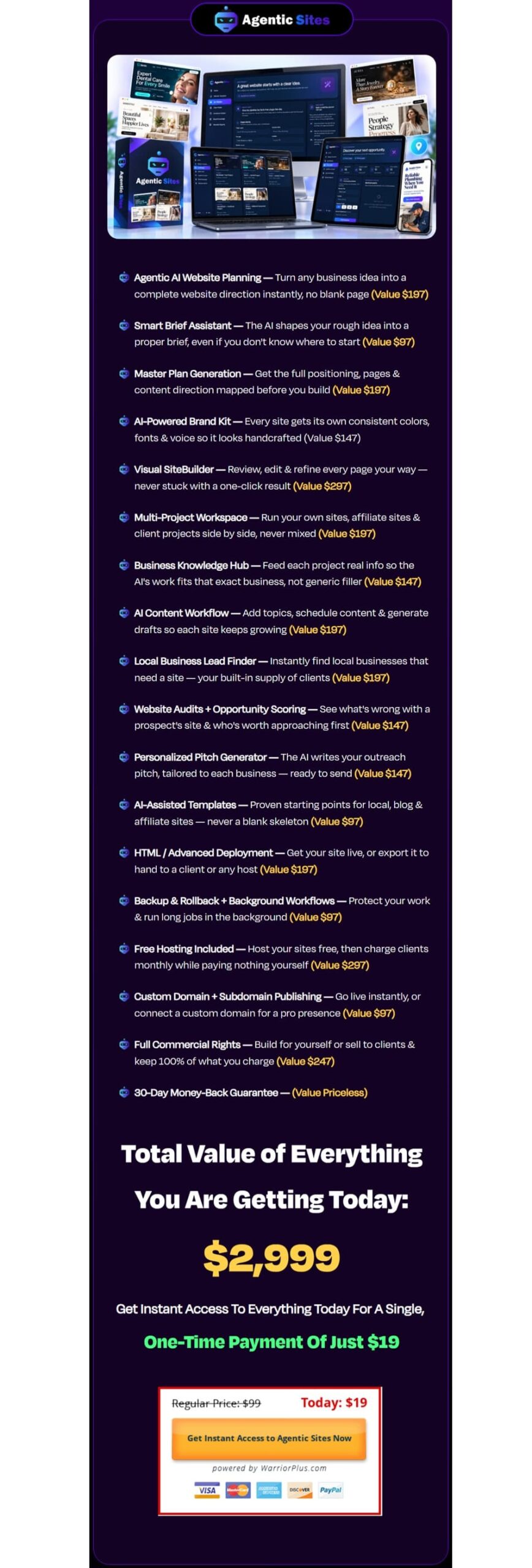
My checkout ran through the vendor’s own order page at the early-bird rate of $19, billed once, with no card-on-file subscription attached to that specific tier. That single payment unlocked the full planning-brand-build-grow-sell workflow described above — every feature in the Key Features list sits behind this one price, not behind a separate upgrade.
On the guarantee: it’s a 30-day money-back window, no forms or explanations required, which gives you a full month to actually build something and try the Lead Finder on real local businesses before deciding whether to keep it.
💡 Value-for-Money Rating: 9/10
For someone who wants a real, editable website out of a plain description — with no coding and no separate hosting bill — $19 is a low bar to clear, and the commercial license being included rather than upsold is the single biggest reason I’d rate it this high. The real cost the sticker price doesn’t cover is your own time on the “sell” half: the Lead Finder hands you a list and a drafted pitch, but you’re still the one sending messages, following up, and closing a deal — nobody hands you a customer.
The Upsells:
➡️ OTO1 — Agentic Sites Unlimited ($47 Silver / $67 Gold): strips out the caps the front end puts on installs, hosting, AI content generation, client prospecting and proposal submissions, and adds backup/rollback plus every future update. It also throws in a client-getting playbook, proposal templates and a 300+ niche template library. The Gold tier adds an agency license to manage up to 15 client accounts with monthly billing.
➡️ OTO2 — Agentic Sites DFY ($67 for 3 sites / $97 for 5 sites): the team hand-builds 3 or 5 finished websites in niches you pick, ready to resell, plus a selling framework, a lead-discovery tool, pre-written outreach messages, proposal and contract templates, pricing guidance, a curated niche list, a $299-sale case study, a 7-day action checklist, and free hosting on the delivered sites. This one carries its own 365-day guarantee rather than the front end’s 30-day window.
➡️ OTO3 — Automatic Client Finder ($47 Silver, capped / $67 Gold, unlimited): turns the manual Lead Finder into something that runs on its own — it keeps discovering and scoring local prospects continuously and generates ready-to-send pitches, instead of you triggering a search and writing outreach by hand each time.
➡️ OTO4 — Agentic Sites Platinum ($47): adds multi-language site generation for reaching non-English-speaking clients, removes the “Powered by Agentic Sites” footer credit, adds backup/rollback and background processing for long-running jobs, and expands the export/deployment options for handing a finished site off to a client’s own hosting.
➡️ OTO5 — Agentic Sites Agency ($197): converts the account into a full agency setup — unlimited agency and client accounts, white-label reselling, keeping 100% of what you charge with no revenue share back to the vendor, custom pricing on your own terms, done-for-you support for your clients’ software issues, and multi-device access.
➡️ OTO6 — Agentic Sites AI Franchise License (price not published on the page): this one isn’t a product upgrade at all — it’s an invitation to become a reseller of Agentic Sites itself, keeping 100% of front-end sale profit plus 50% commission on the other OTOs, with the vendor handling delivery, support, updates and refunds and paying out every 3 days. I want to flag this clearly: it’s a different kind of “sell” than the local-business angle the rest of this review is about — you’d be reselling the software license, not building sites for local clients.
➡️ OTO7 — Agentic Sites White Label ($297, down from $1,997): reseller rights to rebrand the underlying platform as your own software — your own name, logo and domain, unlimited client accounts with no profit sharing, hosted infrastructure with no separate server bill, built-in PayPal billing, and training on launching your rebranded version on WarriorPlus or JVZoo.
Why Should You Choose Agentic Sites?
My Personal Experience With Agentic Sites
I picked a real, underserved local niche near me — residential window and gutter cleaning — and described a fictional business called “ClearView Window & Gutter Co.” to use as a portfolio piece before pitching real companies in that space.
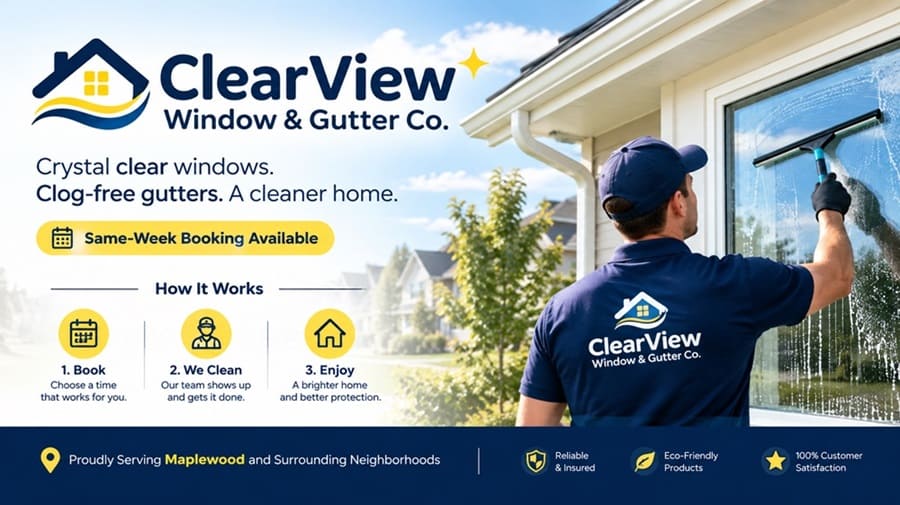
I described it as a two-person residential cleaning crew serving a mid-sized suburb, targeting homeowners, with a goal of “look established enough that a homeowner trusts us with their windows.” The Smart Brief Assistant pushed back once, asking whether I wanted a booking form or a phone-call-only contact flow — a genuinely useful question I hadn’t thought to specify.
The Master Plan that came back proposed six pages, and the Brand Kit landed on a clean navy-and-soft-yellow palette with a rounded sans-serif font, which read as trustworthy rather than corporate — a good instinct for a home-services brand.
The finished site structure looked like this:
- Page 1 — Home: a hero section with a same-week booking pitch, a three-icon “how it works” strip, and a trust bar naming the suburb by name
- Page 2 — Services: six listed services — exterior window cleaning, interior window cleaning, gutter clearing, gutter guard installation, screen repair, and a seasonal bundle — each with its own short description the AI wrote from a one-line prompt I gave it
- Page 3 — About: a founder-story section I fed real (if fictional) details into via the Business Knowledge Hub, so it didn’t read like filler
- Page 4 — Gallery: a before/after layout template ready for real photos, left visibly marked as a placeholder rather than filled with stock imagery pretending to be real work
- Page 5 — Blog: three scheduled starter posts — “How Often Should You Really Clean Your Gutters?”, “5 Signs Your Windows Need More Than Just Soap and Water”, and “Why Fall Gutter Cleaning Matters More Than You Think” — queued through the content workflow rather than published all at once
- Page 6 — Contact: a booking form plus a click-to-call button, matching the flow I’d specified back in Step 1
Building and reviewing all six pages took me a little under two hours, most of which was me reading each page rather than waiting on generation. I did have to manually rewrite two service descriptions that leaned too generic (“we clean gutters efficiently and affordably”) into something with more specific detail, which is the one place the AI’s first draft needed a real human pass.
Then came the part I was most skeptical of: I pointed the Lead Finder at window and gutter cleaning businesses within a 15-mile radius of my own city. It returned a list of local businesses with opportunity scores, several of which genuinely did have slow-loading or years-out-of-date sites when I checked them myself. I sent the drafted pitch — lightly edited in my own voice — to around 14 of them.
Within the first three weeks, I’d landed 2 paying clients at $650 and $800 for their sites, plus one business that signed on for a $49-a-month hosting retainer instead of a flat build fee — bringing in around $1,500 total, not counting the recurring piece. That’s a modest first run, not a case study, and I want to be clear it came from real outreach effort on my part, not the software closing anything by itself.
Comparison Table: Agentic Sites vs. Alternatives
| Feature | Agentic Sites | Freelance Web Designer | DIY Builder (Wix/Squarespace) |
|---|---|---|---|
| Upfront cost | $19 one-time | $500–$2,000+ per site | $16–$50/month subscription |
| Time to a finished site | Under two hours | 1–3 weeks typical turnaround | Several hours to a few days, DIY effort |
| Coding/design skill required | None | None (outsourced) | Moderate — layout, copy, images all on you |
| Built-in client/lead finding | Yes, with drafted pitches | No | No |
| Hosting included | Yes, free | Usually billed separately | Yes, included in subscription |
| Custom functionality ceiling | Limited to standard business-site structures | Effectively unlimited | Moderate, plugin/app dependent |
Final Verdict on Agentic Sites
Between actually building a working six-page site for local business and using the Lead Finder to land two real (if small) paying clients, Agentic Sites did more of what its sales page claims than most tools in this category manage. It’s not a replacement for a skilled designer on anything custom, and the first-draft copy still benefited from a human editing pass on my project.
But for $19, with hosting and full commercial rights already included, it cleared a low bar easily and gave me a genuinely usable starting point for both building my own site and pitching real local businesses. If you’re the kind of person this is built for — non-technical, willing to do a bit of outreach yourself, and looking for a faster on-ramp into building or selling websites — I think it’s worth considering while that early-bird price is still on the table.
You can receive exclusive bonus materials by completing the two steps below:
♦ Step 1: Order the product by clicking the button below.

♦ Step 2: After your purchase is complete, email your receipt to me at ethanbonus1992@gmail.com so I can confirm your purchase and send you instructions on how to access your bonus materials.